ProjectLead

Project management software for small businesses and freelancers

The project you sold, delivered on time. No lost hours.

ProjectLead takes over once the deal is signed. Stages, schedule, tasks, time, emails and appointments in one place. Your client follows progress on their own page, and the month's hours go to InvoiceLead for the invoice.

Free for 3 ongoing projects, no credit card. Sign in with your Lead account, shared by all Lead apps.

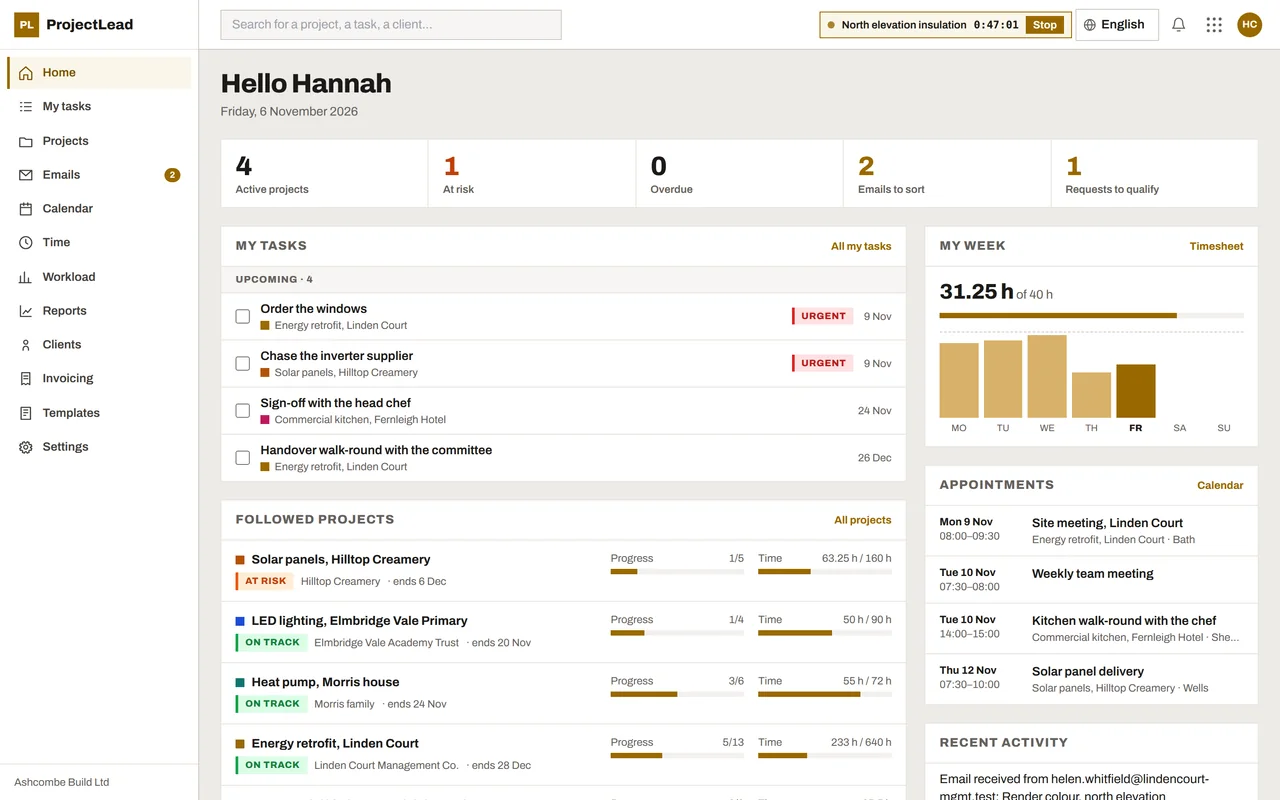
ProjectLead home screen: today's tasks, followed projects with their progress, the week's time and appointments.
Screenshots of the app. The company, its clients and projects are fictional.
4views of the same tasks: board, list, Gantt, calendar
4ways to bill: hourly, monthly, per stage, fixed price
3ongoing projects free, with no time limit
5languages: English, French, German, Italian, Spanish

The film

ProjectLead in 40 seconds.

A signed deal, a project run all the way to the invoice. Every image comes from the app.

42 s, original music
The text of the film
  • Project management for small businesses. The deal is signed.
  • ProjectLead takes over: the deal won in CRMlead, GBP 130,400, becomes a project with 6 stages, 13 tasks and 5 team members.
  • Every stage has its date.
  • The schedule fits on one screen.
  • The whole team on the same tasks.
  • Every hour finds its project.
  • An email becomes a project.
  • Your client follows along, no account: personal link, automatic updates, message to the team.
  • The hours go on the invoice: the month's drafts arrive in InvoiceLead.
  • ProjectLead. The project you sold, delivered on time. projectlead.io, free for 3 ongoing projects.

The handover

The signed deal becomes a project. The project becomes an invoice.

ProjectLead sits between sales and billing. It receives the won deal from CRMlead and prepares the invoice in InvoiceLead.

Fictional example. ProjectLead also works on its own, without CRMlead or InvoiceLead.

Features

The whole project, from the first task to the last hour.

What the big project management tools do well, built for a small business or a freelancer: easy to learn, complete when the project grows.

Overview

Every project has its stages, people and budget.

Progress at a glance: tasks done, time spent against budget, current stage. Each team member has a role and a rate on the project.

  • Status updates: on track, at risk, late
  • Budget in hours and amount
  • Templates to open a project in one click
Overview of a renovation project: tasks, time spent, amount per stage, dated stages and team members.

Gantt

The whole schedule on one screen.

Stages, tasks, milestones and dependencies on one timeline. Drag a bar to reschedule; the today line stays in view. More on the Gantt chart.

  • Day, week and month scales
  • Blocked tasks flagged
  • Milestones for the dates that matter
Project Gantt chart: stages, finished tasks in green, ongoing tasks in ochre, dependencies and the today line.

Board

The whole team on the same tasks.

Board, list, Gantt or calendar: 4 views of the same tasks. Everyone sees what to do, with due dates and priorities.

  • Subtasks, checklists, comments with @mentions
  • Swimlanes by stage or by person
  • Recurring tasks and attached files
Kanban board of the project: To do, In progress, In review and Done columns, cards with due dates, priorities and assignees.

Time

Every hour finds its project.

The timer runs while you work and the weekly timesheet fills itself. Billable hours add up per project, task and person. Time tracking in detail.

  • Timer and weekly timesheet
  • Time and profitability reports
  • CSV export for your accountant
Weekly timesheet: hours per project and task, daily total against capacity.

Email

A request becomes a project.

Connect Gmail, Microsoft 365 or any mailbox. An email from a known client joins its project on its own. A new request becomes a project in one click, with the client created and the first task ready.

  • Any IMAP mailbox
  • Link to a project, turn into a task or reply
  • A mailbox shared with the team
Inbox: an open quote request with the buttons Create a project, Link to a project, Reply and Dismiss.

Workload

See who is overloaded before it happens.

Each person's workload, week by week, against their capacity. Spread the work before the schedule slips.

  • Weekly capacity per person
  • Teams, roles and hourly rates
Team workload per week, in hours and percent of capacity, from green to red.

Billing

Hours go to InvoiceLead.

Each month ProjectLead prepares one invoice draft per project: hourly, monthly fixed fee, per delivered stage or fixed price. You review and issue the invoice from InvoiceLead.

  • Billed time is locked
  • Never two drafts for the same month
Monthly billing: a preview per project, lines of hours and stages, and the Create the drafts in InvoiceLead button.

Client portal

Your client follows the project, without creating an account.

A tracking page per project

Progress, stages, latest shared notes and files. The client can write to the team. You choose what they see.

Updates go out on their own

Every week, every two weeks, every month or at each finished stage: the client gets a clear email you did not have to write.

Online booking

Public booking pages, round-robin hosts, slots blocked by your external calendars. An appointment can open a project.

Tracking page seen by the client on a phone: 33% progress, finished and ongoing stages, team notes.
Tracking page
Booking page: a free one-hour site visit, choice of day and free time slots.
Online booking

AI Assistant

An assistant that prepares the work. You confirm in one click.

The AI Assistant built into ProjectLead knows your projects. It answers, opens the right screen and prepares changes; nothing is written until you click "Confirm".

It answers

Where a project stands, which tasks are late, how many hours this month: it reads your data, with your permissions.

It drafts a plan

A full project plan: stages, tasks, milestones, dependencies and dates, shown in full on a single card.

It applies in one click

A "To confirm" card shows every change. "Confirm" applies it through the same checks as the screen.

Nothing leaves without you

The assistant never emails your clients. It is included in every plan, Free included.

With the Lead apps

One Lead account. Information flows from one app to the next.

CLCRMleadPLProjectLead

A won deal arrives as a project, with the client, address and contacts.

PLProjectLeadILInvoiceLead

Each month, hours and delivered stages become an invoice draft.

ELERPleadSLCLPLILGLVLCA

You manage your Lead account in ERPlead. It opens every Lead app: no new password, no key to paste to connect them.

Project templates

Reusable stages, tasks and checklists, with dates shifted to the project start.

Automations

When a task is done, the stage follows. "When... then..." rules do the rest.

Request forms

A public form that opens a project to qualify as soon as a client fills it in.

Calendars

Your appointments in Google Calendar, Outlook or Apple, invitations sent with an .ics file.

Reports

Hours, billable amounts, costs and margin per project, client or person.

REST API

Your projects, tasks and hours available to your other tools, with an API key.

Team

Roles, teams, rates and capacity. A project can be restricted to its members.

5 languages

English, French, German, Italian and Spanish, and a document language per project.

3 steps

How to get started

  1. Create your account

    Free for 3 ongoing projects, no credit card. Your Lead account also opens the other Lead apps.

  2. Create your first project

    The ready-made template has 4 stages and their tasks, to adapt to your client.

  3. Add your tasks

    One person and one due date per task. The timer then counts the project's hours.

When you first sign in, a short tour shows you the essentials. You can replay it at any time.

Pricing

Start for free. Move to Pro when your projects multiply.

Every feature is in every plan. Only the quantities change.

Free

3 ongoing projects

  • 1 person
  • All features
  • AI Assistant, about 10 requests a month
  • No time limit
Create my account

Pro

Unlimited projects

from EUR 15.83 per month

billed EUR 190 per year, excluding tax

  • 1 person
  • All features
  • For the freelancer running several projects
Get started

Pro+

Unlimited projects

from EUR 32.50 per month

billed EUR 390 per year, excluding tax

  • Up to 5 people
  • All features
  • For the team sharing one schedule
Get started
See the plans

Pro costs EUR 19 per month or EUR 190 per year, Pro+ EUR 39 per month or EUR 390 per year, excluding tax.

You choose the plan inside ProjectLead (Settings, Company). Once paid, it also opens VisitLead and CashLead at the same level, at no extra cost. Finished and archived projects, templates and requests to qualify do not count. A limit only stops you from opening one more project; it never blocks your data.

Guides

Find the right tool for your projects.

Free software, small business, freelancers, Gantt charts, time tracking or an alternative to a known tool: what ProjectLead does for each.

Questions

What people ask us most.

Is ProjectLead really free?

Yes. The Free plan gives you every feature for 3 ongoing projects at a time and one person, with no time limit and no credit card. A finished or archived project frees its slot.

Is ProjectLead suitable for freelancers?

Yes. A freelancer can run projects, hours and appointments alone. Pro opens unlimited projects for one person; Pro+ welcomes up to 5 people.

Do I need CRMlead or InvoiceLead?

No. ProjectLead works on its own. Connected to CRMlead it receives won deals; connected to InvoiceLead it prepares invoice drafts. They connect through the same Lead account, with no API key.

What does the AI Assistant do?

It answers questions about your projects, opens the right screen and prepares changes, such as a full project plan with stages, tasks, milestones and dependencies. Everything shows on a "To confirm" card: one click on "Confirm" applies it, with your permissions.

How do I sign in?

With your Lead account, shared by all Lead apps. If you do not have one, it is created on your first visit, without a credit card. You manage your Lead account in ERPlead.

Do my clients need an account?

No. They follow their project through a personal link and book appointments on a public page.

Which mailboxes can I connect?

Gmail, Microsoft 365 and any IMAP mailbox, such as iCloud or your hosting provider.

Which languages are available?

English, French, German, Italian and Spanish. Each person picks a language, and each project can have its own language for client documents.
Get started

Your next project starts here.

Free for 3 ongoing projects, no credit card.